The Configure Statistics Snapshot Recording dialog is shown in Figure 21. Statistics are generated and captured in memory as you use the application. A snapshot of the statistics can also be recorded to a file by turning on Statistics Snapshot Recording. When Statistics Snapshot Recording is on, the snapshot is updated once a second with the latest statistics and written to a file. Previous statistics snapshot information is overwritten each time the latest statistics information is written to the file. Statistics are only available when there are services that are active. If you deactivate all services before turning off Statistics Snapshot Recording, the statistics snapshot file will be empty.
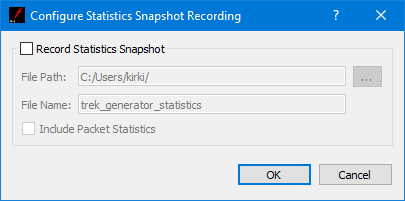
Each field is described below:
Record Statistics Snapshot
The application provides the capability to write a snapshot of application statistics to a file. If you check Record Statistics Snapshot, a snapshot of the application statistics will be written to the file specified.
File Path
The File Path should contain the absolute path to the directory where the statistics snapshot file should be written.
File Name
The File Name field should contain the name to use for the statistics snapshot file.
Include Packet Statistics
The Include Packet Statistics checkbox specifies whether packet statistics should be written to the file.