The Manage Cryptography Settings dialog is shown in Figure 22. It is used to enter cryptography settings. The Cryptography checkbox must be checked and all required cryptography settings must be populated with valid information in order to successfully activate a service that uses cryptography capabilities.
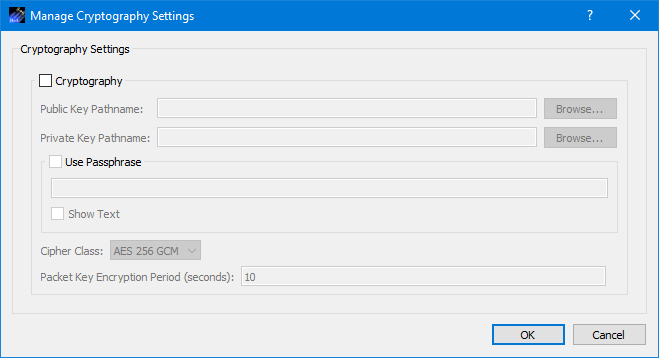
Each field is described below.
Cryptography Checkbox
The Cryptography checkbox is used to specify you want to use cryptography services.
Public Key Pathname
This is the absolute path for the public key file.
Private Key Pathname
This is the absolute path for the private key file.
Use Passphrase
The Use Passphrase checkbox is used to specify that the private key requires a passphrase. If this box is checked, the passphrase must be entered into the text field. The passphrase text will not be displayed in the clear. If you want to see the text entered in the clear, check the Show Text checkbox. This information is not stored when you save a configuration. You will have to enter it each time you restart the application when using cryptography services.
Show Text
The Show Text checkbox is used to display the passphrase text in the clear.
Cipher Class
This option menu is used to select the cipher class.
Packet Key Encryption Period
As mentioned in the TReK Cryptography Services Tutorial, cryptography keys are used to generate other keys behind the scenes. One of these keys is called a Cipher Encryption Key (CEK). The Packet Key Encryption period defines how often to generate a new Cipher Encryption Key (CEK) when streaming encrypted data. It can be configured to generate a new CEK for a packet stream once every "x" seconds to support encryption of high rate packet streams. The time period is measured in seconds. If the packet key encryption period is set to zero, the TReK encryption library will generate a new packet encryption key for every packet in the stream. The TReK encryption library can support the encryption of high rate packet streams by setting the packet key encryption period to a non-zero value. The default value is 10 seconds.