 |
Telescience Resource Kit
TReK Applications
5.4.0 ART
|
|
|
Telescience Resource Kit
TReK Applications
5.4.0 ART
|
The Convert EHS Partial Database Files Into TReK Database dialog is shown in Figure 60. This capability is available from the Options menu and is used to import data in EHS partial database files into a new TReK database. The new TReK database is created during the convert. The convert process can take a while if the EHS partial database files contain a large amount of data. You can continue to work on other tasks in the application while the convert is in work.
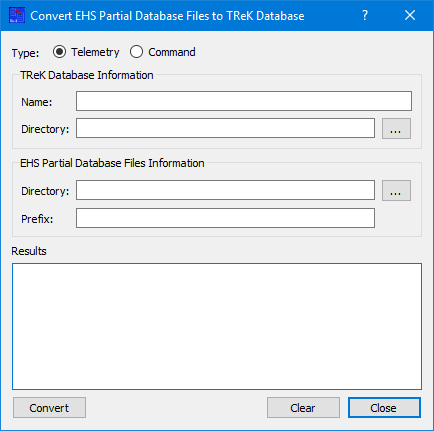
Each field is described below:
Type The Type is used to identify whether Telemetry information or Command information is to be imported.
Name The Name field is used to enter the name of the new TReK database that will be created. If the Telemetry radio button is selected, a new TReK Telemetry database will be created. If the Command radio button is selected, a new TReK Command database will be created.
Directory The Directory field is used to enter the directory where the EHS partial database download files reside. All the files for the convert (import) should be in one directory.
Prefix Filenames for EHS Partial Database files with telemetry information contain a prefix number. This number should be entered in the Prefix field. This field is not applicable for command information and will be grayed out when the Command radio button is selected.
Results The Results area is used to display messages about the results of converting the data from the EHS partial database files to import it into the new TReK database. Any information, warnings, or errors will be displayed here.
Convert The Convert button is used to execute the convert (import). Messages related to the convert process will be displayed in the Results area. The process can take a while if the EHS partial database files contain a large amount of data. You can continue to work on other tasks in the application while the convert is in work.
Clear The Clear button clears the Results area.
Close The Close button closes the dialog.